
- March 27, 2026
- by Thayapathy Vijayakumar
How to Choose the Right Web Hosting Plan (A Complete Beginner’s Guide)
How to Choose the Right Web Hosting Plan — A Complete Beginner’s Guide
Choosing a web hosting plan can feel overwhelming. Shared, VPS, Cloud, WordPress, Reseller — what does it all mean? And more importantly, which one is right for you?
This guide simplifies everything. In 10 minutes, you will know exactly what type of hosting your website needs and how to pick a plan that fits your budget.
Step 1: Understand the Different Types of Web Hosting
Shared Hosting
Your website shares a server with hundreds of other sites. It is the most affordable option and ideal for:
- New websites and blogs
- Small business websites with low to moderate traffic
- Personal portfolios or landing pages
KoiWebHost shared hosting starts at ₹90/month and includes free SSL, automatic backups, and cPanel access.
WordPress Hosting
A server environment optimised specifically for WordPress. It delivers faster load times, automatic WordPress updates, and better security for WP sites.
- Bloggers and content creators
- Business websites built on WordPress
- E-commerce stores using WooCommerce
KoiWebHost WordPress hosting starts at ₹100/month.
VPS Hosting (Virtual Private Server)
A virtual machine that gives you dedicated resources on a shared physical server. You get the performance of a dedicated server without the cost.
- Growing businesses with increasing traffic
- Developers who need root access and custom configurations
- E-commerce stores that need higher performance
Reseller Hosting
Lets you create and sell hosting plans to your own clients under your own brand. Ideal for web designers, developers, and agencies.
KoiWebHost reseller hosting starts at ₹499/month with full white-label branding.
Step 2: Identify What Your Website Needs
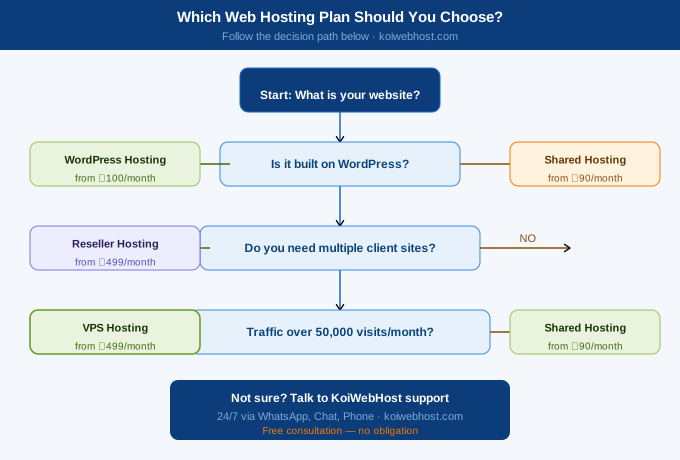
Before picking a plan, answer these four questions:
- How much traffic do you expect? (Under 10,000 visits/month → Shared. More → VPS or Cloud)
- Do you need special software? (WordPress site → WordPress hosting)
- Do you need full control of your server? (Developer project → VPS with root access)
- Are you managing multiple client websites? (Agency/freelancer → Reseller hosting)
💡 Beginner Tip If you are launching your first website or small business site, Shared Hosting is almost always the right starting point. You can always upgrade later — KoiWebHost makes plan upgrades seamless. |
Step 3: Compare the Key Features
When evaluating any hosting plan, always check these features:
Feature | Why It Matters |
Uptime Guarantee | Look for 99.9% uptime. Downtime = lost customers and lost revenue. |
Free SSL Certificate | Encrypts your site data. Required for SEO and customer trust. |
Storage (SSD preferred) | SSD storage loads websites up to 20x faster than traditional HDD. |
Bandwidth / Data Transfer | Unlimited bandwidth means no surprise bills when your traffic spikes. |
Customer Support (24/7) | Ensure support via chat, phone, email, and ideally WhatsApp. |
Automatic Backups | Critical for disaster recovery. KoiWebHost uses JetBackup 5. |
Free Migration | Moving from another host? A good provider migrates your site free. |
Scalability | Can you upgrade without switching providers? You should be able to. |
Step 4: Set Your Budget
Web hosting does not have to be expensive. Here is a realistic budget breakdown:
- New website / blog: ₹90–₹150/month (Shared or WordPress Hosting)
- Small business website: ₹150–₹499/month (WordPress or Shared with higher resources)
- Growing e-commerce store: ₹499–₹999/month (VPS Hosting)
- Agency or developer: ₹499+/month (Reseller or Master Reseller Hosting)
🔒 Risk-Free: 30-Day Money-Back Guarantee KoiWebHost offers a 30-day money-back guarantee — so you can try any plan risk-free. If you are not satisfied for any reason, you get a full refund. |
Step 5: Choose Your Provider
Once you know your needs and budget, choose a hosting provider that has:
- A proven track record with positive customer reviews
- Data centers with low latency for your target audience
- Transparent pricing — no hidden fees on renewal
- A support team that actually responds quickly
KoiWebHost is rated 5 stars by customers across India, offers 99.9% uptime, SSD storage, and 24/7 support via every channel imaginable — including WhatsApp.
